Timesheet certification management review submitted timesheets.
Things to do:
- Accept or reject pending timesheets.
- View submitted timesheets.
Step 1: This timesheets page will display all submitted timesheets awaiting a decision. Filters allow you to narrow down your search. Select the colored boxes to filter the view of submissions. Once all filters are applied, the results will show.

Step 2: To view submitted timesheets from drivers click or select their name and the full timesheet will appear. Each timesheet will display each route the driver drove, date, hours worked, start and end times for each day and the type of entry the driver used.
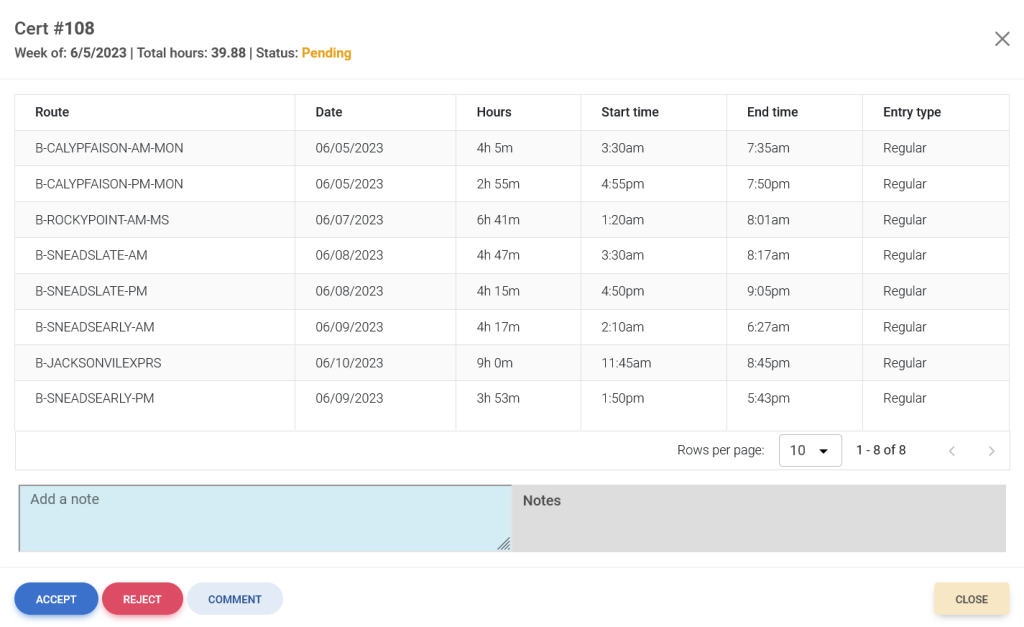
Step 3: Once all of the information on the timesheet is reviewed, a admin has the ability to accept, reject, or leave comments on the driver’s timesheet.